
TL;DR: AI skin retouching uses machine learning to detect faces, isolate skin, remove blemishes, and smooth tone while preserving pores. This 2026 guide explains the six-stage pipeline, compares 18 tools, gives a natural-results workflow, and covers disclosure laws, bias, and the cleanup-vs-identity line.
Introduction
We’ve all seen both ends of the spectrum: the uncanny, plastic-skinned selfie that screams “filtered” and the portrait that looks so natural that we never suspect anyone has retouched it. In 2026, the difference is no longer whether you use software, but how intelligently you use it. AI skin retouching has evolved from a beauty-app gimmick into a standard part of professional photo retouching workflows. Today’s tools can smooth imperfections while preserving the pores, freckles, and natural texture that make skin look real.
In this guide, we explore how AI skin retouching works, which tools are worth trying across free web apps, mobile apps, and professional desktop software, and how to achieve natural-looking results step by step. We also discuss ethical considerations and disclosure requirements as regulations evolve in 2026. Whether you’re processing 800 wedding photos, enhancing an e-commerce model’s portrait, or polishing a LinkedIn headshot, you’ll find an approach that suits your workflow—along with common mistakes to avoid.
What Is AI Skin Retouching (and What It Actually Does)
At its simplest, AI skin retouching uses machine-learning models to correct skin automatically or semi-automatically instead of relying on manual brushwork. While older tools smeared a single Gaussian blur across the entire face, modern tools identify skin pixels, distinguish blemishes from natural texture, and rebuild corrected areas to match the surrounding pores. When retouchers use these tools carefully, they achieve invisible results; when they push the sliders too far, they create grotesque effects.It is important to understand that “AI skin retouching” is not one product but a family of techniques, ranging from one-tap mobile filters to full desktop pipelines that handle RAW files, batch exports, and style consistency across an entire shoot.
The best tools treat skin as a high-frequency texture layer on top of a low-frequency tone layer, smoothing only the latter and re-adding the former. That frequency-separation idea is the same one high-end retouchers have done by hand for years; the AI just executes it in milliseconds. Crucially, real AI retouching should preserve identity: it removes a pimple, it does not change the shape of your nose. That distinction will matter a lot when we get to ethics.
How AI Skin Retouching Works
Most AI portrait-retouching tools use a multi-stage pipeline rather than a single model. Each stage performs a specific task to improve image quality while preserving natural facial details.
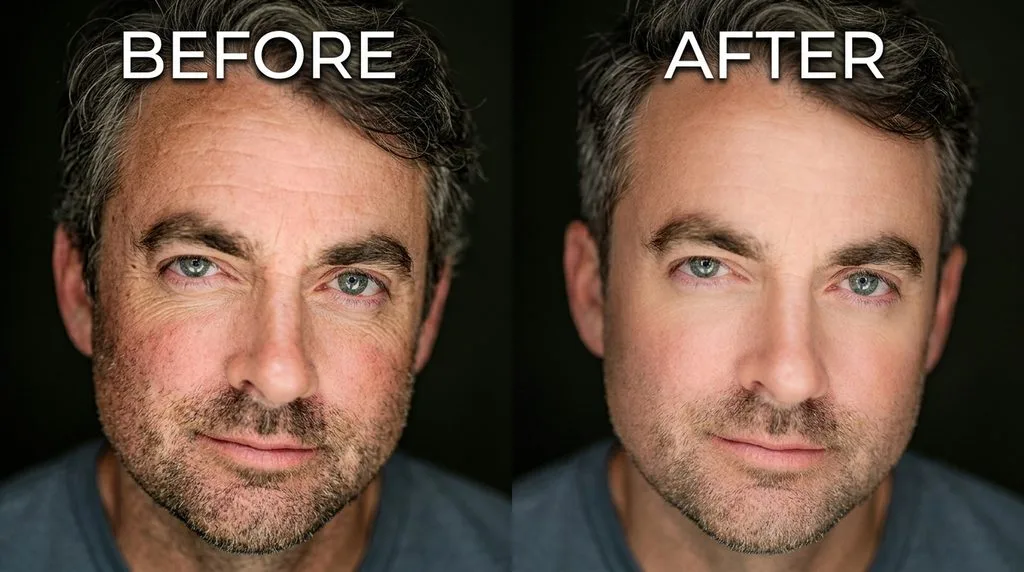
Stage 1 — Face and Landmark Detection:
The system identifies faces and key facial points, including the eyes, nose, mouth, and jawline. This helps ensure edits remain within the correct areas.
Stage 2 — Face Parsing and Skin Segmentation:
A segmentation model creates masks for skin, lips, eyes, eyebrows, hair, and background. These masks allow the tool to edit specific regions without affecting other parts of the image.
Stage 3 — Blemish Detection and Removal:
The system detects acne, spots, and unwanted hairs. GAN-based or diffusion-based inpainting models replace these defects with realistic skin texture.
Stage 4 — Texture-Preserving Smoothing:
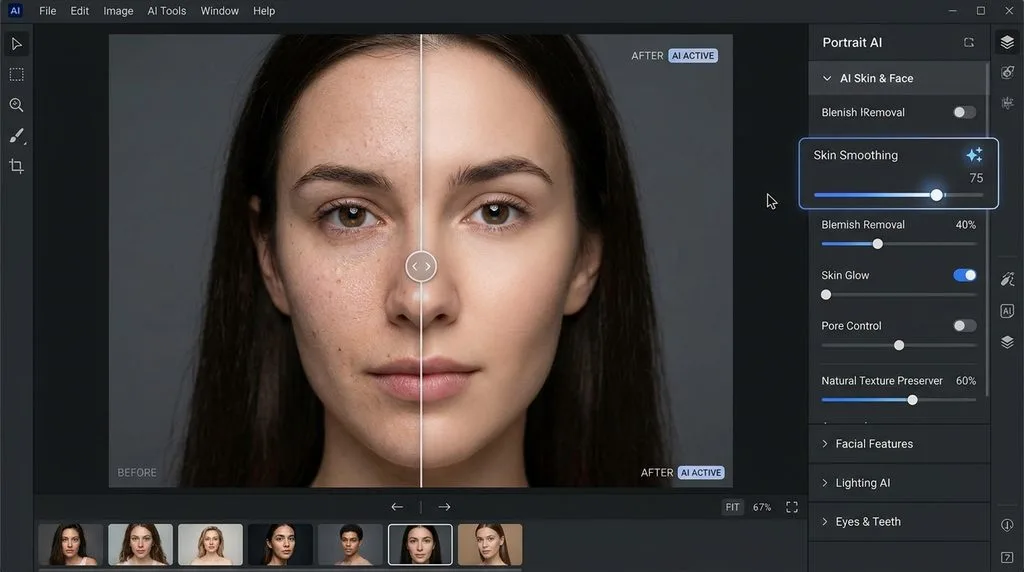
The image is separated into frequency layers. The tool smooths uneven tones while preserving high-frequency details such as pores and fine skin texture. This prevents the artificial, blurred appearance common in basic filters.
Stage 5 — Tone and Color Adjustment:
Masked color correction reduces redness, evens skin tone, and improves under-eye areas while keeping the original colors of eyes, teeth, hair, and clothing.
Stage 6 — Additional Enhancements:
Optional features improve teeth brightness, eye clarity, and facial lighting. These adjustments usually work independently, allowing users to control each effect.
Three major model families power AI portrait retouching: GANs such as BeautyGAN, PSGAN, and StyleGAN enable fast beautification but may cause subtle identity changes.Diffusion models offer more controlled editing and realistic image inpainting.RetouchGPT (AAAI 2025) explores interactive, instruction-based face retouching using language models.A 2025 RigFace study combines Stable Diffusion with 3D face models to control lighting, expression, and pose while preserving identity.Lightweight CNNs support fast, near-real-time processing directly on mobile devices.These technologies power many modern AI photo-editing workflows.
Key Capabilities
Modern AI skin retouching covers a surprisingly broad set of edits, and most tools bundle several of these into one “enhance” button. Knowing what each capability actually does helps you pick the right tool and turn off the modules you do not need. Here are the core capabilities you will encounter across the category:
- Blemish and acne removal — detects and inpaints individual spots without blurring the surrounding skin.
- Skin smoothing with texture preservation — automated frequency separation that keeps pores and fine detail intact.
- Even skin tone and redness reduction — masked color grading to normalize blotchiness and rosacea.
- Under-eye circle correction — targeted brightening and desaturation on the eye-region mask.
- Portrait relighting — reshaping light and shadow on the face, often via diffusion-based relight modules.
- Teeth whitening — masked hue and value shift, adjustable independently of skin.
- Eye brightening — saturation and sharpness boosts confined to the iris and sclera.
- Stray-hair cleanup — inpainting of flyaway hairs along the hairline and shoulders.
- Batch processing — apply one tuned preset across hundreds or thousands of exports, critical for wedding and e-commerce volume.
Who Uses AI Skin Retouching
Portrait and wedding photographers. High-volume shooters were the earliest professional adopters hand-retouching 500 gallery images simply isn’t economical. Tools like Evoto, Imagen AI, Aftershoot Retouch, and Retouch4me plug into the cull-to-edit pipeline and apply a consistent look across an entire session. A Retouch4me survey of 363 working photographers (via Jenova.ai, April 2026) found only 24% would let AI take full creative control, while 76% want to stay in the driver’s seat. So the winning model in portrait photography is AI as assistant, not autopilot: pros tune the sliders once, batch-apply, then hand-check a sample.
E-commerce and beauty brands. When you’re shooting 40 SKUs with six models each, consistent skin polish is a production requirement. Photoroom, Pixelcut, Canva, and Photoshop handle model-skin cleanup at scale, and beauty campaigns use AI to keep skin tone and texture consistent across a product line. This is where professional beauty retouching services overlap with in-house AI tools: brands combine automated batch cleanup with a final human pass for hero images.
Social creators and influencers. One-tap selfie and video retouch is the volume end. Facetune, Meitu, Wink, AirBrush, and fast-growing Hypic target daily posters. Savvier creators dial intensity down to 30–50% and stack only one or two adjustments to avoid the signature filtered look.
Headshots, dating, and video. AI headshot retouching is growing fast—subtle polish with identifying features intact (see our professional headshot editing guide). For dating photos, coaches advise light adjustments only; over-retouched photos are a red flag. Video is the 2025–2026 frontier: Wink leads in video beauty, Facetune added video retouch, and desktop options include HitPaw VikPea, PrettyUp (~$7.99/mo), and Filmora’s AI Face Retouch. DaVinci Resolve 21 reportedly includes an AI blemish tool on the timeline
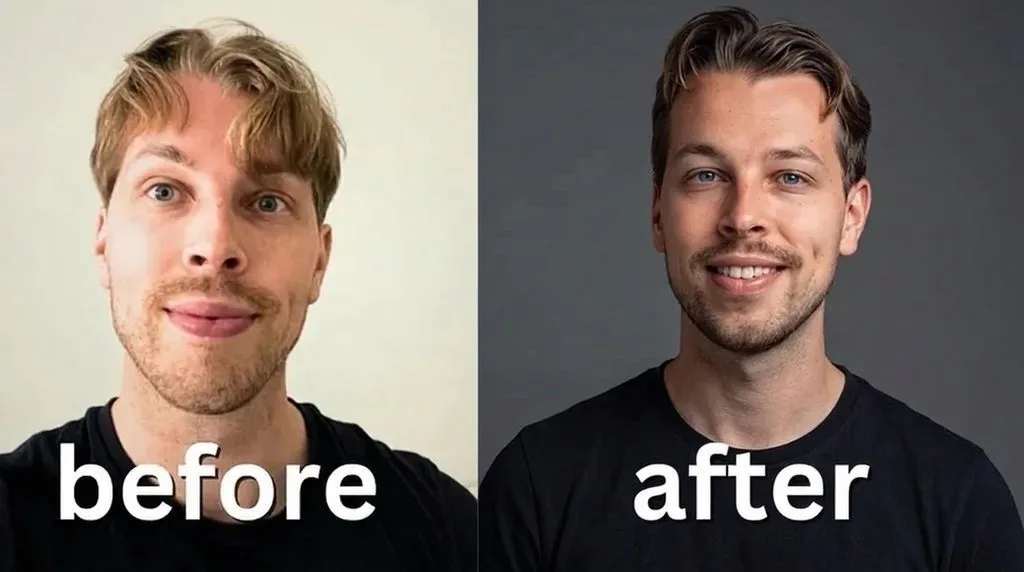
Best AI Skin Retouching Tools in 2026
The tool landscape splits cleanly into three tiers: free web tools for quick fixes, mobile apps for selfie and video creators, and pro desktop tools for photographers and high-volume workflows. All prices below are approximate and time-sensitive as of late 2026 — check the vendor’s current pricing page before subscribing, because several tools (notably Evoto) have raised prices repeatedly. For a broader look at the category, our roundup of the best retouching software in 2026 covers these and more.
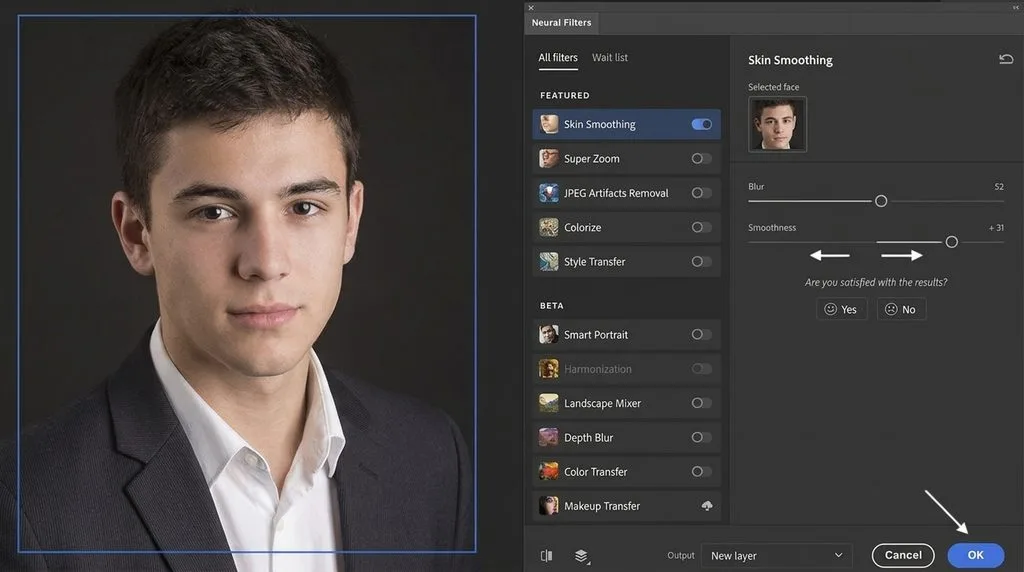
Evoto AI specifically designs its tools to handle high-volume photo editing. It isolates skin pixels from hair, clothing, and background, applies frequency-separation-style smoothing that preserves texture, offers per-image global and local sliders, and supports batch processing via watched folders with RAW input and JPG, TIFF, PNG, or original-format output. Its pitch is “adjust once, apply to thousands,” and it charges credits per export — roughly $49 one-time for 200 credits, with annual plans around $79–89/yr at time of writing. Basic color and crop features are free. It is the go-to for wedding and portrait photographers processing high volumes, but its credit-based pricing can get expensive at scale.
SnapEdit is the simplest free entry point. Upload a photo, and its AI automatically identifies and removes blemishes, smooths pimples and freckles, enhances texture, then lets you adjust intensity and white-tone sliders before downloading.
The free tier provides 10 credits per month, adds a watermark, and limits image resolution to 1,600 pixels. The Standard plan costs approximately $6 per month when billed annually, includes around 4,800 credits per year, and removes the watermark. It is ideal for casual users who want a quick fix without installing anything.
Wink, owned by Meitu, is the standout if video is part of your workflow. Its web tool offers photo retouch with free credits, plus Reshape controls including “Soften hair” and “Double chin,” and its mobile app is one of the leading video beauty apps. Sensor Tower data lists Wink VIP at approximately $5.99/wk, $9.99/mo, or $49.99/yr. If you retouch both photos and video for social, Wink is the one to try first.
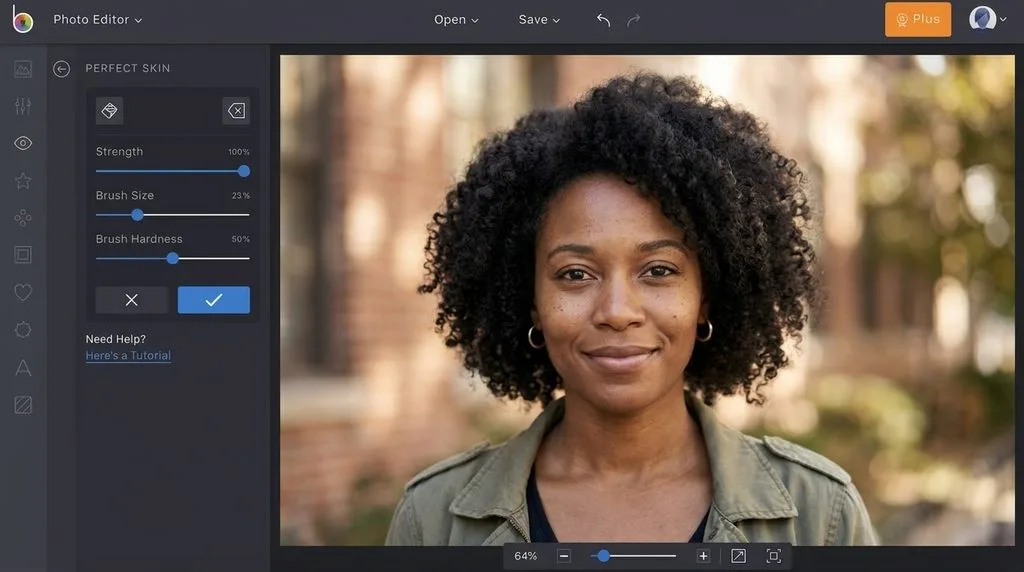
Comparison
| Tool | Key features | Approx. price | Best for |
|---|---|---|---|
| Evoto AI | Face smoothing, blemishes, relighting, batch, RAW | $49 one-time; $79–89/year | Wedding and portrait volume |
| SnapEdit | Blemish removal, smoothing, tone sliders | Free limited; ~$6/month | Quick web fixes |
| Wink | Photo/video smoothing, reshape, makeup | Free credits; VIP ~$5.99/week | Vloggers and video creators |
| Photoshop | Neural Filters, Firefly, frequency separation | ~$19.99/month | Professional retouchers |
| Lightroom | AI masks, healing, texture, Remove | Photography Plan ~$119.88/year | Color-focused photographers |
| Retouch4me | Heal, dodge-and-burn, tone, teeth, eyes | $124–149/plugin; cloud ~$20/month | Subtle professional work |
| PortraitPro | Skin, makeup, relighting, reshaping | $54.95–139.95 one-time | Studios and fashion |
| Luminar Neo / Aperty | Skin AI, face tools, relighting | Neo ~$79–119; Aperty from ~$4/month | Adobe alternatives |
| ON1 Portrait AI | Face detection, smoothing, batch | ~$59.99 one-time | Budget-conscious pros |
| Topaz Photo AI | Denoising, sharpening, upscale, face recovery | ~$99 one-time | Image-quality repair |
| Imagen AI | Culling, editing, consistent skin tones | Subscription; retouch from ~$7/month | Consistent wedding galleries |
| Aftershoot Retouch | Batch skin, blemish, teeth, hair edits | ~$20/month annual | High-volume studios |
| Fotor | One-tap skin, wrinkle, teeth and eye tools | Free limited; Pro ~$8.99/month | Casual and small-business users |
| Picsart | One-click skin, blemishes, object and video tools | Free; Plus ~$60/year | Social creators |
| BeFunky | Smoothing brush, strength and shine controls | Free; Plus ~$49.95/year | Casual web editing |
| Canva | Magic Eraser/Edit, basic touch-ups | Free; Pro ~$119.99/year | Social and small-business designs |
| Facetune | Smooth, reshape, makeup, video retouch | Free; ~$35.99/year | Influencers |
| Meitu | Beauty camera, smoothing, reshape, portraits | Free; VIP ~$25/year | Selfie users |
Free web tools cost nothing and need no installation, but may limit resolution, add watermarks, restrict credits, or over-smooth skin. Mobile apps are fast and may support video, yet strong beauty defaults and face-data privacy deserve attention. Desktop tools offer texture control, RAW support, batch processing, and plugins, but bring subscriptions, credits, and learning curves. Choose by workload and budget.
How to Retouch Skin Naturally with AI (Step-by-Step)
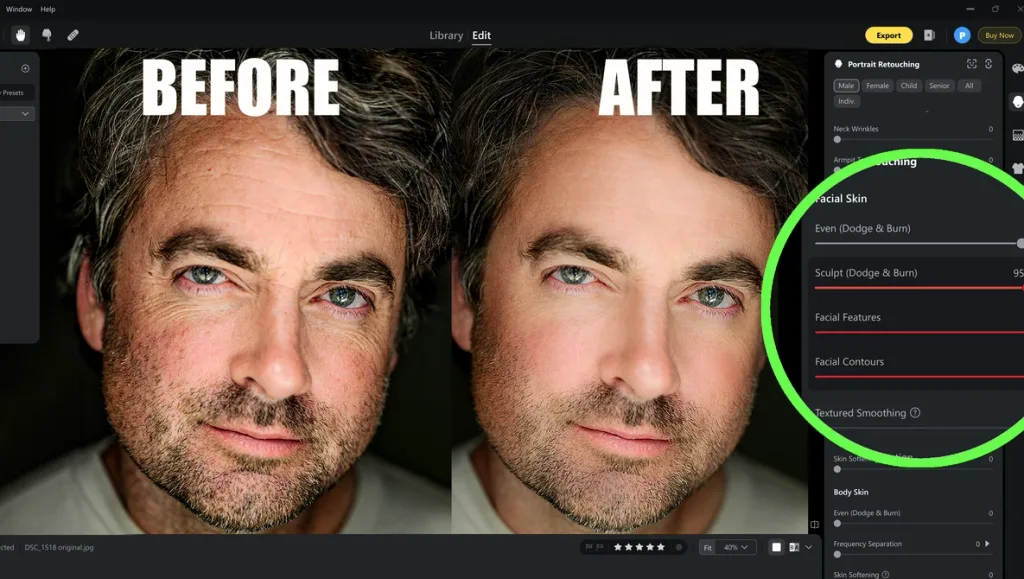
The biggest complaint about AI skin retouching is “plastic skin.” This often results from excessive settings. A careful workflow preserves realistic texture. See our AI retouching tips for guidance.
- Start with a strong original. AI cannot reliably repair motion blur, missed focus, or poor lighting. Capture sharp, well-lit portraits, then use AI for minor cleanup rather than image rescue.
- Begin with low intensity. Set the smoothing slider around 30–50%, not 100%. Many applications apply too much smoothing by default, so reduce the setting before evaluating the result.
- Inspect at 100% zoom. Examine the forehead, nose, and cheeks. If pores and fine details disappear, lower the smoothing until natural skin texture returns.
- Correct blemishes selectively. Run the automatic blemish detector first. Remove remaining spots individually with a healing brush instead of increasing smoothing across the entire face.
- Adjust tone and redness separately. Use masked skin-tone and redness controls to reduce uneven patches. Avoid global adjustments that flatten natural shadows and facial structure.
- Keep extra edits subtle. Teeth whitening and eye brightening should look almost invisible. If either change is obvious when viewing a thumbnail, reduce its strength.
- Include a human review. For paid or professional work, inspect the final image at 100% on a calibrated display. AI may not recognize that a freckle is part of someone’s distinctive appearance rather than an imperfection.
The guiding rule is simple: retouching should not immediately attract attention. Natural edits enhance the photograph without making the subject look like a different person. Compare the before-and-after versions and ask whether the changes improve the image or replace the person’s natural features. When uncertain, reduce the effect. The best result preserves character, texture, and believable skin without sacrificing natural facial detail.
Ethics, Bias, and Disclosure
Ethical AI skin retouching depends on three questions: Did the subject consent? Are edits disclosed when required? Does the change improve the image or alter the person’s identity? Excessive smoothing removes natural skin texture, makes people look less like themselves, and reinforces narrow beauty standards. The Filters of Identity paper, published in June 2025, argues that augmented-reality beauty filters reinforce racialized and gendered beauty norms. It proposes transparency measures, including a “Disclaimer Block” tool.
AI systems can reproduce bias. Studies document preferences for lighter skin and slimmer bodies in generative models. Retouching tools can underperform on darker skin because some segmentation and inpainting systems were trained mainly on lighter-skinned datasets.
Disclosure rules are expanding. Norway’s 2021 Digital Advertising Transparency Act requires labels on retouched commercial images. The UK Advertising Standards Authority expects disclosure when retouching materially changes appearance in beauty advertising. Article 50 of the EU AI Act introduces transparency duties for AI-generated or manipulated content, with rules applying from August 2026. TikTok, Instagram, and YouTube also have AI-content labeling requirements.
In the United States, reports describe a 2026 settlement involving Meta and state attorneys general that may restrict extreme beauty filters for minors. However, the source could not be verified because of access restrictions, so this claim remains unverified. Researchers have raised concerns linking beauty filters with body dysmorphia, while lawsuits allege that Meta’s features contribute to the condition.
The boundary is cleanup versus identity change. Removing a temporary blemish, evening skin tone, or whitening teeth generally preserves identity. Face swaps, age changes, altered smiles, and major reshaping transform it; these edits call for explicit consent and may require disclosure. For commercial or editorial work, obtain written permission for significant changes, disclose edits when required, and keep the original RAW file. When uncertain, be transparent.
Limitations and Risks
For all the progress, AI skin retouching still gets things wrong.
Excessive smoothing or inaccurate segmentation masks can create texture artifacts, such as waxy patches, repeated pore patterns, and visible halos around hair and lips. Identity drift is a subtler failure: after aggressive smoothing and reshaping, the person in the photo still looks like a person, but not quite like themselves. Darker skin tones remain a weak point for many models, with poorer segmentation and more visible inpainting artifacts, a problem rooted in training-data composition rather than any fixable slider.
Cloud-based tools also process your face data on remote servers, which is a privacy consideration for sensitive or commercial work; on-device processing is the privacy-friendly alternative where available. Batch processing at scale can propagate a single bad setting across hundreds of images, so a hand-checked sample before full export is not optional. For professional work, always retain the unedited original.
The Future of AI Skin Retouching
Looking ahead from late 2026, four trends are reshaping the field. First, video and real-time retouching are moving from novelty to expectation: Wink and Facetune already handle video, and platform-level on-device effects are becoming standard. Google’s research on real-time mobile AI (August 2025) shows how knowledge distillation plus MediaPipe puts generative camera effects on phones without sending data to the cloud. Second, on-device AI via Apple and Android NPUs will keep improving both speed and privacy, with distilled models that match cloud quality for the common edits. Third, diffusion-based and instruction-driven editing — the RetouchGPT-style approach of describing the edit in plain language — will replace older one-trick GAN filters, giving users far more control without manual masking.
Fourth, workflow integration will deepen: AI retouch will be a stage inside cull-to-edit-to-deliver pipelines like Imagen and Aftershoot rather than a standalone app you open separately. The retoucher of 2027 will spend less time brushing and more time directing. Taken together, these shifts mean faster, more private, and more controllable retouching for everyone.
Conclusion
AI skin retouching in 2026 is a mature, capable technology that has solved the hard part — preserving texture while removing flaws — and the remaining problems are mostly human ones: knowing which slider to turn down, when to disclose, and where cleanup ends and identity change begins.
Choose a tool tier that matches your workload, keep smoothing below 50%, inspect every edit at 100% zoom, and review all paid deliverables yourself before sending them to clients. The best retouching, as ever, is the kind no one notices.
FAQ
What is AI skin retouching?
AI skin retouching uses machine-learning models to detect faces, segment skin pixels, remove blemishes via inpainting, and smooth tone while preserving pore texture — a multi-stage pipeline, not a single blur filter.
Is there free AI skin retouching?
Yes. SnapEdit, Fotor, BeFunky, Canva, and Photoroom all offer free tiers with AI credits, though free versions usually include watermarks, resolution caps, or monthly credit limits.
Does AI skin smoothing ruin skin texture?
Not if used correctly. Pro tools use automated frequency separation that preserves the high-frequency texture layer; “plastic skin” happens when users push the smoothing slider to 100%, not because of the technology itself.
Is AI skin retouching ethical, and do I have to disclose it?
Most people accept light retouching, such as removing blemishes and subtly evening out skin tone, but significant alterations require the subject’s consent. In commercial advertising, Norway and the UK mandate disclosure, the EU AI Act requires synthetic-content labeling, and platforms like TikTok and Instagram enforce AI-content labels. When in doubt, disclose.
Which AI skin retouching tool is best for professional photographers?
For high-volume wedding and portrait work, Evoto AI, Imagen AI, Aftershoot Retouch, and Retouch4me are the leading options, all offering batch processing and texture-preserving smoothing. Adobe Photoshop with Neural Filters remains the industry standard for pixel-level control.
Can AI retouch skin in video, not just photos?
Yes. Wink and Facetune both support video skin retouching, and desktop options include HitPaw VikPea, PrettyUp, and Filmora’s AI Face Retouch; DaVinci Resolve 21 reportedly adds an AI blemish tool to the timeline.
Will AI retouching replace human retouchers?
Most photographers do not think so. In a 2026 survey, 76% of working photographers wanted to retain creative control, with AI positioned as a time-saving assistant for batch work rather than a replacement for judgment and taste.