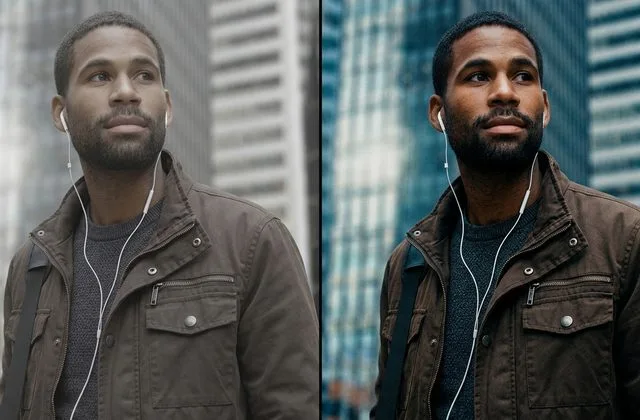

Expert retouching is not a filter. It is the pixel-level craft of making an image look like the best version of itself — so natural that nobody can tell it was edited. A professional retoucher removes blemishes but keeps pores. Smooths skin but preserves texture. Sculpts light with dodge and burn instead of dragging a “smooth” slider. The difference between a $5 Fiverr gig and a $150 editorial retouch is not the software — both use Photoshop. It is the judgment, the technique, and the restraint. If you can see the editing, it was not done by an expert.
This guide walks you through exactly what professional photo retouching is, the eight types you can buy, the techniques the top retouchers actually use, how to tell a true expert from a beginner in fifteen minutes, and when it makes sense to hire one versus doing it yourself or using AI.
What Professional Photo Retouching Actually Is
Photo retouching is the precision cleanup and enhancement that happens after a photo leaves the camera. It sits one layer deeper than basic editing. Basic editing — cropping, exposure, white balance, contrast — adjusts the whole image. Retouching targets specific pixels: the blemish on a model’s cheek, the dust on a product, the stray hair across a face, the dead-looking diamond in a ring shot.
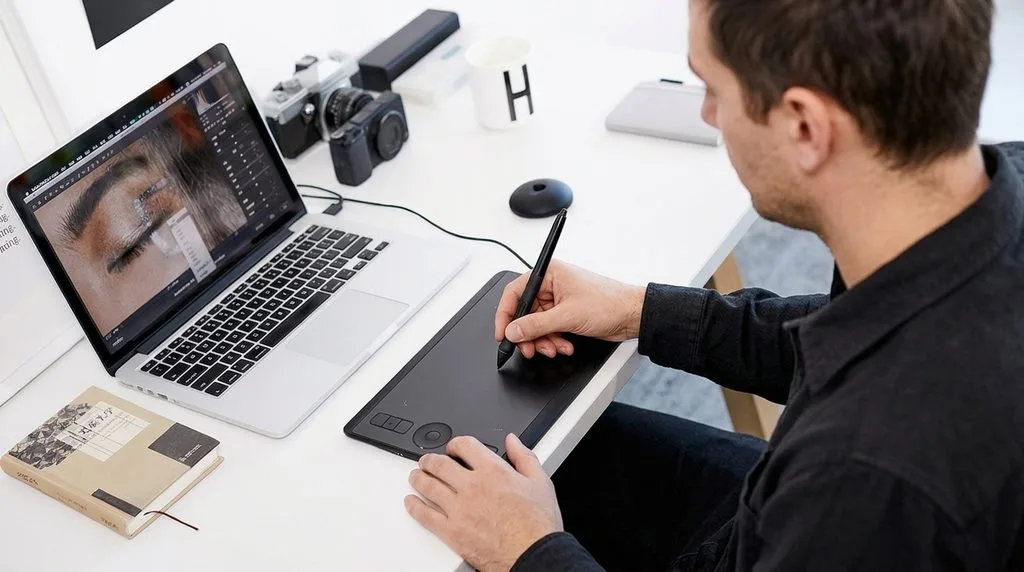
Adobe Photoshop remains the industry standard, and every serious retoucher works on a calibrated monitor with a graphics tablet. But the tool is not what makes someone an expert. What makes someone an expert is knowing what not to touch. The most common complaint about retouching is over-editing — plastic skin, unnaturally white teeth, bodies shaped beyond recognition. An expert’s signature is invisibility. You look at the image and think, “That person has great skin.” You do not think, “That was retouched.”
The Philosophy of Invisible Retouching
The best retouching follows one rule: enhance, do not fabricate. A portrait should look like the subject on their best day, not like a different person. A product should look like the product the customer will actually receive — cleaner, sharper, better lit — but not transformed into something else. This matters commercially. Over-retouched cosmetics images get returned at higher rates. Over-slimmed apparel photos get returned when the fit does not match. Expert retouching protects your conversion rate by making images look premium and honest.
The Eight Types of Professional Photo Retouching
Retouching is not one service. It is a family of eight, and each one uses different techniques and commands different prices. Match the type to your shoot or you will overpay for the wrong work.
| Type | What It Includes | Typical Rate / Image | Best For |
|---|---|---|---|
| Portrait retouching | Skin cleanup, blemish removal, teeth whitening, eye enhancement, stray hair | $1.50 – $15 | Headshots, LinkedIn, family, portraits |
| Beauty & glamour retouching | Frequency separation, dodge & burn, makeup correction, skin sculpting at 300% zoom | $5 – $50+ | Cosmetics, skincare, magazine beauty |
| Fashion retouching | Model retouching + garment wrinkle removal, fabric correction, styling fixes | $3 – $100+ | Lookbooks, campaigns, editorial fashion |
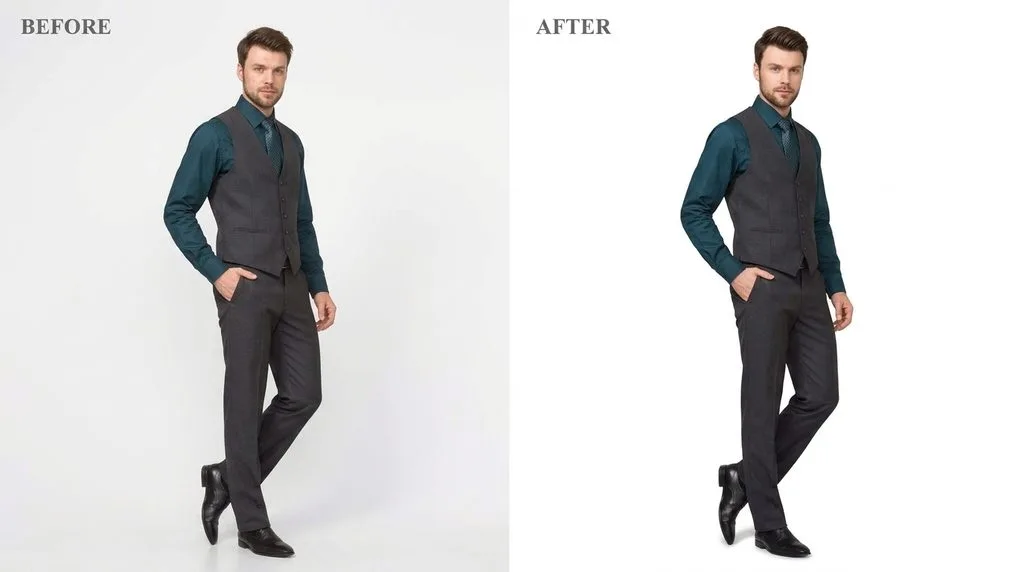
| Product & ecommerce retouching | Dust/scratch removal, color correction, shadow creation, marketplace compliance | $0.79 – $5 | Amazon, Shopify, Etsy, DTC catalogs |
| Jewelry retouching | Reflection removal, diamond sparkle, metal color correction, focus stacking | $0.99 – $15 | Jewelry, watches, luxury accessories |
| Wedding retouching | Culling, color grading, skin cleanup, dress smoothing across hundreds of images | $0.25 – $6 | Wedding photographers, event galleries |
| Real estate retouching | HDR blending, sky replacement, window pull, virtual staging, lawn enhancement | $0.50 – $30 | Realtors, property listings, interiors |
| Editorial & composite retouching | Complex compositing, background replacement, multi-image composites, campaign hero work | $15 – $500+ | Ad campaigns, billboards, magazine covers |
Most ecommerce catalogs sit in the product tier. Portrait and wedding work usually lands in the middle. Beauty, fashion, and jewelry hero shots need expert-level work — and that is where the price jumps.
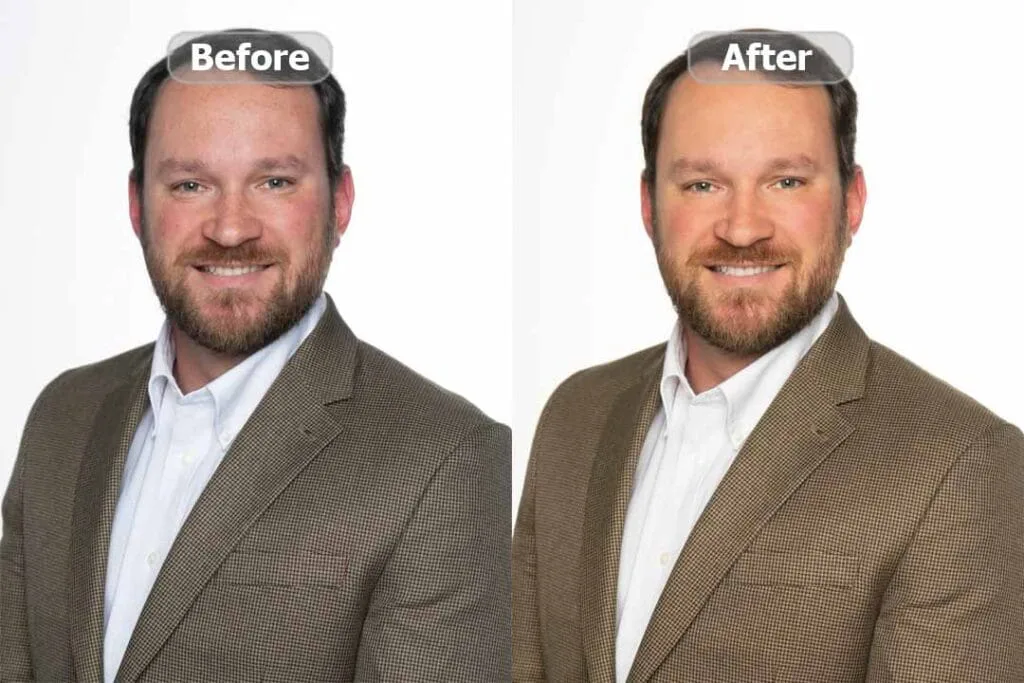
The Techniques Experts Actually Use
Anyone can drag a slider. An expert uses a specific toolkit of non-destructive techniques that preserve the original image and keep edits reversible. If a retoucher cannot name these techniques, they are not an expert.
Frequency separation is the foundation of high-end skin work. It splits the image into two layers: a low-frequency layer holding color and tone, and a high-frequency layer holding texture and detail. The retoucher cleans blotchiness and uneven tone on the low layer without touching the high layer — so pores, freckles, and skin texture stay perfectly intact. A solid guide to frequency separation retouching will show you why this single technique separates professionals from hobbyists.
Dodge and burn on 50% gray Soft Light layers lets the retoucher sculpt light pixel by pixel — brightening one side of a nose, darkening a jawline, adding dimension to a flat-lit face — without altering a single original pixel. This is how editorial skin gets its sculpted, three-dimensional look.
Luminosity masking applies adjustments only to specific tonal ranges — brightening just the highlights, darkening just the shadows — with pixel-precise control. Healing Brush and Patch Tool remove dust, blemishes, and stray hair. Liquify handles subtle shape correction for fabric, hair, and silhouettes. Clone Stamp and Content-Aware Fill remove distractions and rebuild missing areas.
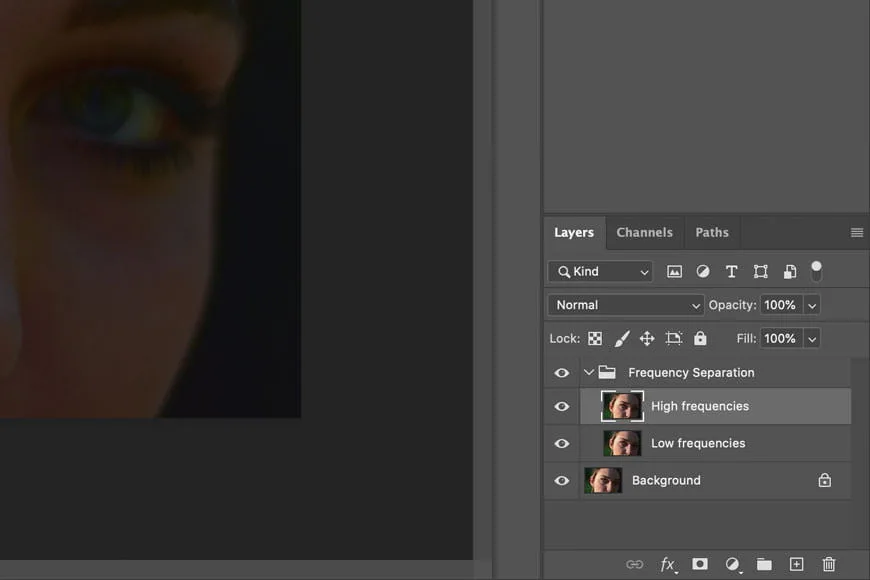
The telltale sign of expert work: every edit lives on its own layer, nothing is done destructively to the original, and the final file arrives as a layered PSD. If a studio delivers only a flat JPEG and cannot show you layers, the work was done by a junior editor or an AI filter.
The Expert Retouching Workflow, Step by Step
A professional retoucher does not open an image and start clicking. They follow a disciplined sequence that keeps quality consistent across hundreds of images.
- Ingest and cull. They sort the batch, flag the hero images, and group similar lighting setups so settings can sync.
- Global correction. Exposure, white balance, contrast, and color grading applied consistently across the batch in Camera Raw or Lightroom.
- Cleanup pass. Dust, spots, blemishes, stray hairs, and sensor dust removed with Healing Brush and Clone Stamp.
- Structural retouch. Frequency separation on skin, dodge and burn for dimension, Liquify for subtle shape correction.
- Detail enhancement. Eyes brightened, teeth whitened subtly, hair and fabric details sharpened selectively.
- Color and shadow final. Product color matched to physical samples, shadows and reflections added for realism.
- Quality control at 200% zoom. A second reviewer checks edges, skin texture, and color consistency.
- Export. Layered PSD archived, final JPEG/PNG/TIFF delivered in the requested sizes and color profiles.
This workflow is why expert retouching costs more than a filter — and why it looks completely different.
How to Spot a True Expert in 15 Minutes
You do not need a photography degree to evaluate a retoucher. Look for these seven quality signals. If a portfolio fails more than two, keep looking.
- Natural skin texture. Zoom to 200%. Pores should be visible. Smooth, plastic skin = beginner or over-reliance on AI.
- Clean edges. Hair, fur, and fabric edges should be sharp and free of halos or fringing.
- Consistent color. Across a catalog or gallery, the same product color should look identical in every shot.
- Realistic light and shadow. Added shadows should match the direction and quality of light in the original photo.
- No warped geometry. Look at walls, door frames, and straight lines near the edges of the image. Liquify overuse bends reality.
- Layered PSD delivery. An expert works non-destructively and can hand over the working file.
- A portfolio in your category. A great beauty retoucher may be terrible at jewelry. Ask for samples matching your product type.
ExpertPhotography’s roundup of the best photo editing services and Imagen’s ranking of top photo retouching companies both emphasize the same point: judge a retoucher on a free test edit of your hardest image, not on their portfolio of their best days.
AI vs Expert Retouching: Where Each Actually Wins
AI tools have improved dramatically, and they now handle bulk color, exposure sync, and basic background removal at pennies per image. But AI still fails consistently on the work that drives revenue.
| Task | AI-Only | Expert Human |
|---|---|---|
| Bulk color & exposure correction | Excellent | Overkill |
| Simple background removal | Good on clean edges | Faster at volume |
| Hair, fur, glass, sheer fabric | Fails — leaves halos and fringing | Excellent |
| Jewelry & reflective surfaces | Fails — dead stones, fake reflections | Excellent |
| Natural skin texture | Over-smooths — plastic look | Excellent |
| Consistent catalog color | Variable | Excellent |
| Composite & creative work | Cannot match brief | Excellent |
| Cost per image | $0.05 – $0.22 | $0.79 – $150+ |
The 2026 professional default is hybrid. AI processes the easy 80% of a catalog at near-zero cost, and an expert retoucher handles the 20% of hero images, complex products, and beauty shots where AI falls apart. The blended cost lands around $0.30–$0.60 per image — cheaper than manual-only and dramatically higher quality than AI-only. For wedding photographers shooting 75,000 images a year, the AI-first path saves roughly $15,000 annually — as long as a human does the final QC on gallery hero shots.
How to Hire an Expert Retoucher (Without Getting Burned)
Hiring the wrong retoucher costs twice: once for the bad work, once for your time fixing it. Follow this process and you will avoid almost every mistake.
First, run a free test edit. Every confident retoucher will edit 2–5 sample images at no charge. Send your hardest images — the hair shot, the jewelry, the skin-tone challenge — not your easiest. Attach a written brief: target background color, shadow style, skin smoothing intensity, and a do-not-touch list. Set a 24-hour turnaround and see if they hit it. Ask for a layered PSD, not just a JPEG. Review at 200% zoom. Then request one small revision and see how fast and clean the fix comes back.
Second, confirm the ten non-negotiables before signing: free trial on real images, transparent tier pricing, NDA available on request, unlimited revisions within a defined window, 24-hour standard turnaround with rush options, a volume discount ladder, a portfolio in your specific category, a named senior editor on your account, secure file transfer (never email attachments), and multi-stage human quality control.
Third, start small. If the trial passes, place a 25–50 image paid order before committing to bulk volume. Upwork’s photo retoucher marketplace is a reasonable place to find freelancers for mid-volume work, while specialized studios handle high-volume catalogs. FixThePhoto’s portrait retouching services page shows what a structured, tiered offering should look like — compare any vendor against that level of specificity.
How to Brief an Expert Retoucher (Cuts Revisions in Half)
A one-line brief — “make it look good” — produces one-line-quality work. A documented brief produces work you can ship without re-checking. Include:
- Two or three “gold-standard” reference images that represent your target look.
- Written style rules: background hex code, shadow style, skin-smoothing intensity (light/medium/high), color grading direction.
- File-naming convention and export specs: dimensions, format, color profile (sRGB for web, CMYK for print), max file size.
- A do-not-touch list: birthmarks to keep, logos to preserve, gemstone facets to leave alone.
- Turnaround expectation and revision policy, confirmed in writing.
For portrait work specifically, a clear guide to portrait retouching techniques will help you articulate exactly what you want — light cleanup versus full beauty retouching are two different price points, and a good brief makes sure you pay for the right one.
Pricing Tiers for Professional Retouching (Quick Reference)
Since cost varies wildly by complexity, here is the 2026 benchmark. Full breakdowns live in dedicated pricing guides, but these numbers will keep you from being overcharged.
- Basic cleanup (dust, spots, minor color): $0.69 – $1.69 per image.
- Standard retouching (blemishes, skin tone, teeth, wrinkles): $1.69 – $3.50 per image.
- Medium professional (frequency separation, dodge & burn, shape correction): $2.49 – $6.99 per image.
- High-end / editorial (complex composites, campaign heroes, magazine quality): $15 – $150+ per image.
Volume discounts are standard: roughly 10% off at 100+ images, 25% at 500+, and up to 40% at 1,000+. A studio that cannot quote a specific per-image rate in writing — or that hides behind “contact us for pricing” on every tier — is usually more expensive than they want you to know.
The Five Mistakes That Ruin Retouching
Even good retouchers can produce bad work when the client makes these mistakes. Avoid them.
- Choosing the cheapest quote. A $0.10 “clipping path” is almost always AI marketed as manual, and it will fail zoom inspection. You will pay twice.
- No reference images. Without a target look, the retoucher guesses — and you get five revision rounds.
- Rushing deadlines. 6-hour rush work costs 30–50% more and increases error rates. Plan your shoot schedule around standard 24-hour turnaround.
- Skipping the test edit. A portfolio shows a studio’s best day. Your files show its normal day. Always test on your own hardest images.
- Over-retouching. The number one reason product photos get returned is that the real item does not match the edited image. Expert retouching enhances; it never fabricates.
When to Hire an Expert vs Do It Yourself
The math is simple. If you value your time at $75/hour and retouching 100 images takes four minutes each, that is 6.6 hours — about $500 in opportunity cost. Outsourcing the same batch at $1.50 per image costs $150. You save $350 and get your weekend back. Hire an expert when editing eats more than 20% of your workweek, when monthly volume tops 50 images with a repeatable style, when you need consistent quality across hundreds of SKUs, or when you lack Photoshop expertise for jewelry, hair, or transparent products. Do it yourself only when volume stays below 20 images a month, when every image is one-of-one personal art, or when you have not yet articulated your style clearly enough to brief someone else.
Frequently Asked Questions
What is the difference between photo editing and photo retouching?
Photo editing adjusts the whole image — exposure, white balance, contrast, cropping, color grading. Photo retouching targets specific pixels: removing blemishes, dust, stray hairs, smoothing skin, sculpting light. Most professional projects involve both, but they are priced separately and require different skills.
What does an expert retoucher actually do?
An expert retoucher uses non-destructive techniques — frequency separation, dodge and burn, luminosity masking, healing brush — to enhance an image while preserving natural texture. They work in layers, deliver editable PSD files, and follow a documented brief so quality stays consistent across hundreds of images. The mark of expert work is that you cannot tell the image was edited.
How much does professional photo retouching cost?
Basic cleanup starts at $0.69–$1.69 per image. Standard portrait retouching runs $1.69–$3.50. Medium professional work with frequency separation and dodge & burn is $2.49–$6.99. High-end editorial and campaign retouching ranges from $15 to $150+ per image. Volume discounts of 10–40% apply at 100+ images.
Can AI replace expert retouchers?
Not for revenue-critical images. AI handles bulk color, exposure, and simple background removal well, but it consistently fails on hair, glass, jewelry, reflective surfaces, and natural skin texture. The 2026 professional standard is hybrid: AI on the easy 80%, expert humans on the 20% that drives conversions.
How do I know if a retoucher is any good?
Run a free test edit on your hardest images, not your easiest. Review at 200% zoom — check for natural skin texture, clean edges, consistent color, and realistic shadows. Ask for a layered PSD. Request one revision and see how fast it comes back. A true expert will pass all of these; a beginner will fail at least two.
What is frequency separation and why does it matter?
Frequency separation splits an image into two layers: one holding color and tone, one holding texture. A retoucher can clean uneven skin tone on the color layer without smudging pores and texture on the detail layer. It is the single technique that separates professional skin retouching from the plastic, over-smoothed look beginners produce.
Should I hire a freelance retoucher or a studio?
Freelancers work best for ongoing mid-volume needs with a direct relationship — expect $12–$200+/hour. Studios work best for high volume, fast turnaround, and consistent quality across large catalogs — expect $0.25–$10 per image with 24-hour turnaround. For 500+ images a month, a studio is almost always the better choice.
How long does expert retouching take?
Basic cleanup takes 3–5 minutes per image. Standard portrait retouching takes 8–15 minutes. Medium professional work with frequency separation takes 20–35 minutes. High-end editorial retouching can take 45 minutes to 6+ hours per image. Standard delivery is 24 hours; 6-hour and 12-hour rush options usually cost 25–50% extra.
Final Thought: You Are Hiring Judgment, Not Clicks
Expert retouching is a strange craft. The best work is the work you never notice. When you hire a professional retoucher, you are not paying for someone who knows where the Photoshop tools are — you are paying for someone who knows when not to use them. The restraint to keep a freckle. The judgment to leave a wrinkle. The skill to make a diamond sparkle without making it look fake. Find that person, give them a clear brief, and your images will do the selling for you.